- Cookie sheet rebuilt: Accept all, Reject non-essential and Customise are now equal weight
- The sheet is now positioned so it never covers the page's main button
- Now visible from first paint rather than appearing after a delayed script
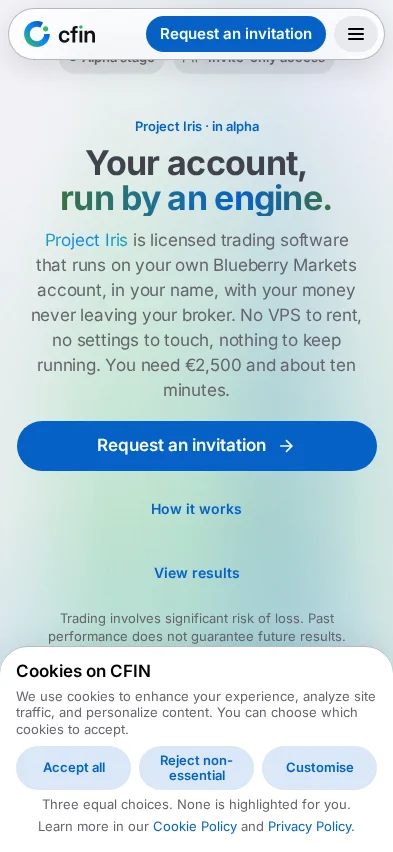
The cookie prompt that appears on cfin.be has been rebuilt around one simple rule: none of the three choices should look more important than the others. Accept all, Reject non-essential and Customise are now the same size, the same shape and the same visual weight. None is filled solid while the others are outlined, and none takes the eye before you have read the question.





Why equal weight
A cookie prompt that makes one answer visually louder than the others — a bright filled button for “accept”, a quiet grey outline for “reject” — nudges a reader towards the louder option before they have actually decided anything. The sheet now states its own intent directly, in a line underneath the three choices: “Three equal choices. None is highlighted for you.” That sentence is not decoration; it describes the actual CSS — the three buttons share one class, so a change to one applies to all three automatically rather than needing to be kept in sync by hand.
Where it appears, and where it does not
The sheet is a non-modal bottom sheet: it sits at the bottom of the screen without dimming or locking the rest of the page, so you can still read, scroll and use the header while deciding. It appears on the homepage, the FAQ, the Performance page, the registration flow and the sign-in screen. The blog does not show it inline — a “Cookie preferences” link in the footer reopens it there instead.
It never covers the thing you came to do
A cookie sheet that sits over a page's main button is an old, familiar annoyance — you want to sign in or continue registering, and the prompt is in the way. The sheet is now positioned, on every page that shows it, so that it never covers the sign-in page's Sign in button or the registration flow's Continue button. If you want to act before deciding on cookies, the control you came for stays reachable.
What “Customise” shows
Choosing Customise expands a detailed view with four categories: Essential Cookies (always on, and marked as such — the site will not function without them), Preference Cookies, Analytics Cookies and Marketing Cookies. Only Essential starts pre-ticked; the other three start unticked, matching the same “nothing is pre-selected for you” principle as the three main buttons.
How to open it again
- Scroll to the footer of any public page.
- Find the “Cookie preferences” link.
- Selecting it reopens the same sheet, with your current choices already reflected in the detailed view.
Visible from the first paint, not shown late by a script
The sheet used to render hidden, with a script making it visible after a short delay once the page had finished loading. In practice that delay was measured to be inconsistent: visible well within a second on most page loads, but in one out of four measured runs still not visible a second and a half in, and only reliably visible by around five seconds. A visitor could interact with the page — including a cookie-gated control — before the prompt had even appeared on screen. The sheet now renders visible by default and is hidden again, at once, only in the specific cases where there is already a reason not to show it (for instance, a stored preference already on record) — so a browser with JavaScript disabled, or simply slow to start, now sees the prompt on the very first paint rather than not at all.