- Chat bubble and panel now use a flat Iris glyph instead of the old robot mascot image
- The glyph ships in matched light and dark versions, like the larger Iris mark elsewhere on the page
- The assistant's name, 'Robot Iris', is unchanged — this is a visual icon change only
The icon that represents the assistant across the public site — on the corner chat bubble, and in the header of the open chat panel — has been replaced. Where it used to be a mascot-style robot image, it is now a plain glyph belonging to the same visual family as the larger Iris mark used elsewhere on the homepage.
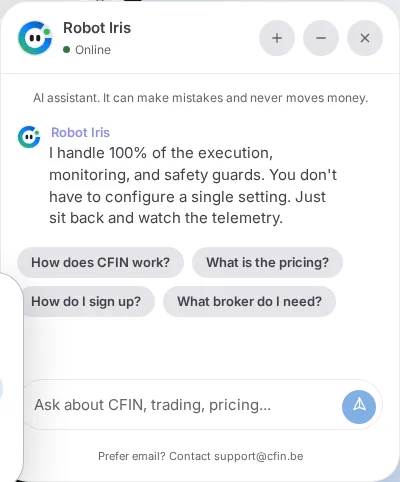




What actually changed
The glyph is a new, flat SVG mark, distinct from the earlier mascot-style image it replaces on these surfaces. It is deliberately simple — no embedded animation of its own — so it can sit comfortably at small sizes on a launcher bubble as well as at the larger size it takes in the chat panel's header.
Theme-matched, not one image stretched to fit
The glyph ships as two versions, one tuned for light appearance and one for dark, swapped automatically depending on your current setting — the same pattern already used for the larger Iris mark elsewhere on the page. That matters more than it might sound: a single asset designed for a light surface, placed unchanged onto a dark panel, tends to look flat or washed out. Two deliberately distinct versions avoid that.

What did not change
The assistant's name in copy and in the accessible labels around it is still “Robot Iris” — the glyph is a visual change to the icon asset, not a rename of the product. Buttons and headings that refer to it by name, such as “Ask Robot Iris”, are unchanged by this pass.
Why it changed
The larger Iris mark elsewhere on the homepage had already moved to this same glyph family. Carrying the old mascot image on the chat bubble and panel left the site with two different visual identities for what is meant to be the one assistant — a plain inconsistency between surfaces more than a decision about either individual mark. This pass brings the chat surfaces in line with the mark used everywhere else.
A technical reason the launcher uses its own copy of the glyph
The launcher bubble loads its own distinct copy of the glyph file rather than sharing one URL with other instances of the same mark on the page. Some browser engines back every image that shares one source file with a single underlying animation timeline, so showing, hiding or transform-animating one instance — which the fixed-position, GPU-promoted launcher does constantly as it toggles with the chat panel — could stop that shared timeline for every other copy of the same mark, including the larger one in the hero section. A distinct file for the launcher means it can no longer affect an animation playing anywhere else, at the cost of one small extra asset.
Where to see it
- Open the homepage and look at the chat bubble in the bottom-right corner.
- Select it to open the panel, and look at the small mark beside “Robot Iris” in the header.
- Switch your device between light and dark appearance to see both versions of the glyph.
Not loaded lazily, on purpose
Unlike most images on the page, the glyph is loaded eagerly rather than deferred until it scrolls into view. The file itself is small enough that eager loading carries no meaningful cost, and because the launcher bubble can be visible from the moment the page loads — fixed in the corner, not waiting to scroll into view at all — deferring it would risk the mark not being requested until a point that never actually arrives for a visitor who never scrolls.